반응형
Flutter 기본위젯 - RichText 위젯
RichText() 함수 원형
const RichText({
  Key? key,
  required InlineSpan text,
  TextAlign? textAlign,
  TextDirection? textDirection,
  Locale? locale,
  StrutStyle? strutStyle,
  TextWidthBasis? textWidthBasis,
  TextHeightBehavior? textHeightBehavior,
})
1. text ( 필수 )
- 스타일이 적용된 텍스트의 내용을 정의합니다. InlineSpan 객체를 사용하여 텍스트와 스타일을 지정하며, 주로 TextSpan을 사용합니다.
- 타입 : InlineSpan
RichText(
  text: TextSpan(
    text: 'Hello, ',
    style: TextStyle(color: Colors.black),
    children: [
      TextSpan(
        text: 'RichText',
        style: TextStyle(fontWeight: FontWeight.bold, color: Colors.blue),
      ),
      TextSpan(
        text: ' Widget!',
        style: TextStyle(color: Colors.green),
      ),
    ],
  ),
);

2. textAlign
- 텍스트의 정렬 방식을 지정.
- 타입 : TextAlign?
- TextAlign.left: 왼쪽 정렬
- TextAlign.center: 가운데 정렬
- TextAlign.right: 오른쪽 정렬
- TextAlign.justify: 양쪽 정렬
RichText(
  text: TextSpan(
    text: 'Aligned Text',
    style: TextStyle(color: Colors.black),
  ),
  textAlign: TextAlign.center,
);
3. textDirection
- 텍스트의 읽기 방향을 설정합니다.
- 타입 : TextDirection?
- TextDirection.ltr: 왼쪽에서 오른쪽 (기본값)
- TextDirection.rtl: 오른쪽에서 왼쪽
RichText(
  text: TextSpan(
    text: 'Right-to-Left Text',
    style: TextStyle(color: Colors.black),
  ),
  textDirection: TextDirection.rtl,
);
4. locale
- 텍스트의 지역화(locale)를 설정합니다. 언어별 서식 규칙을 정의할 때 사용됩니다.
- 타입 : Locale?
RichText(
  text: TextSpan(
    text: 'Localized Text',
    style: TextStyle(color: Colors.black),
  ),
  locale: Locale('fr', 'FR'), // 프랑스어 (France)
);
5. strutStyle
- 텍스트의 줄 높이를 제어합니다. 텍스트 줄 높이와 관련된 추가 스타일을 설정할 때 사용 됩니다.
- 타입 : StrutStyle?
RichText(
  text: TextSpan(
    text: 'Strut Style Example',
    style: TextStyle(color: Colors.black),
  ),
  strutStyle: StrutStyle(height: 1.5),
);
6. textWidthBasis
- 텍스트 폭 게산 기준을 설정합니다.
- 타입 : TextWidthBasis?
- TextWidthBasis.parent: 부모 위젯의 폭 기준.
- TextWidthBasis.longestLine: 텍스트의 가장 긴 줄 기준.
RichText(
  text: TextSpan(
    text: 'Width Basis Example',
    style: TextStyle(color: Colors.black),
  ),
  textWidthBasis: TextWidthBasis.longestLine,
);
7. textHeightBehavior
- 텍스트 높이의 동작 방식을 정의합니다.
- 타입 : TextHeightBehavior?
RichText(
  text: TextSpan(
    text: 'Height Behavior Example',
    style: TextStyle(color: Colors.black),
  ),
  textHeightBehavior: TextHeightBehavior(
    applyHeightToFirstAscent: false,
    applyHeightToLastDescent: true,
  ),
);
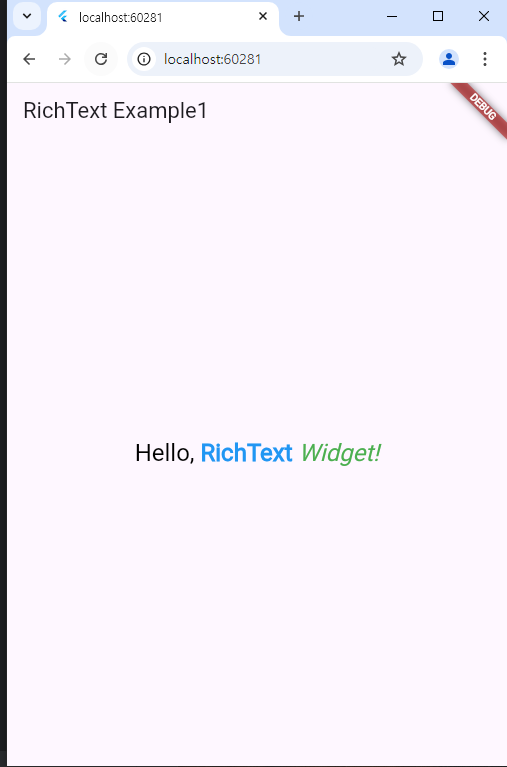
8. 샘플코드
import 'package:flutter/material.dart';

void main() {
  runApp(const MyApp());
}

class MyApp extends StatelessWidget {
  const MyApp({super.key});

  @override
  Widget build(BuildContext context) {
    return MaterialApp(
      home: Scaffold(
        appBar: AppBar(title: const Text('RichText Example')),
        body: Center(
          child: RichText(
            textAlign: TextAlign.center,
            text: TextSpan(
              text: 'Hello, ',
              style: TextStyle(fontSize: 24, color: Colors.black),
              children: [
                TextSpan(
                  text: 'RichText',
                  style: TextStyle(
                    fontWeight: FontWeight.bold,
                    color: Colors.blue,
                  ),
                ),
                TextSpan(
                  text: ' Widget!',
                  style: TextStyle(
                    fontStyle: FontStyle.italic,
                    color: Colors.green,
                  ),
                ),
              ],
            ),
          ),
        ),
      ),
    );
  }
}
반응형
'프로그래밍 > Flutter' 카테고리의 다른 글
| [ Flutter Widget ] 플러터 기본위젯 - Radio (0) | 2025.01.01 |
|---|---|
| [ Flutter Widget ] 플러터 기본위젯 - Checkbox (3) | 2025.01.01 |
| [ Flutter Widget ] 플러터 기본위젯 - Textfield (1) | 2025.01.01 |
| [ Flutter Widget ] 플러터 기본위젯 - Text (2) | 2025.01.01 |
| [ Flutter Widget ] 플러터 기본위젯 (1) | 2024.12.31 |

